How we built a custom lens configurator in Magento 2

Buying prescription glasses is not the same as adding a pair of sneakers to your shopping cart. The customer must choose a frame that fits their face, select the correct lens type, enter the exact prescription per eye, and then decide on coatings and filters. It is a personal, optical, and technical process that must be flawless in a webshop. Standard Magento does not offer a solution for this. Yet, the modern consumer expects exactly that experience online.
For Wink & See, a Dutch online optician offering prescription glasses starting from €29.95, Younify developed a fully custom lens configurator as a Magento 2 module. In this article, we show how we approached this and the technical and UX choices involved.

The challenge: a complex product in a simple flow

Wink & See sells prescription glasses, sunglasses, reading glasses, and multifocal glasses entirely online, without a physical store. Customers configure their glasses themselves: from frame to lens type, and from diopter to blue light filter. This makes the ordering process fundamentally different from that of a standard e-commerce product.

The core of the problem? Magento 2 includes configurable products and bundled products, but neither covers the complexity of prescription glasses. Consider the following challenges:

  • Multiple lens types with price impact. Single-vision lenses, progressive (multifocal) lenses, sun lenses, and photochromic lenses, each with a different surcharge. For example, prescription reading glasses start at €29.95, while multifocal lenses cost an additional €30 and a blue light filter another €20.
  • Prescription per eye. The customer must provide the sphere (SPH), cylinder (CYL), axis (AXIS), and potentially the addition (ADD) for each eye. This involves up to eight numerical fields, each with specific validation rules and ranges.
  • Prism and pupillary distance (PD). Advanced options that not every customer needs, but which must be available, potentially at an additional cost.
  • Real-time price calculation. Every choice affects the total price. The customer must see what their glasses will cost at any moment, without surprises at checkout.
  • Manageability. Wink & See wants to independently adjust steps, options, and prices from the Magento admin, without having to involve a developer every time.

In the standard Magento product flow, there is simply no provision for this. Custom options do not come close to the required logic, and a third-party configurator for optics was not available at the level Wink & See required.
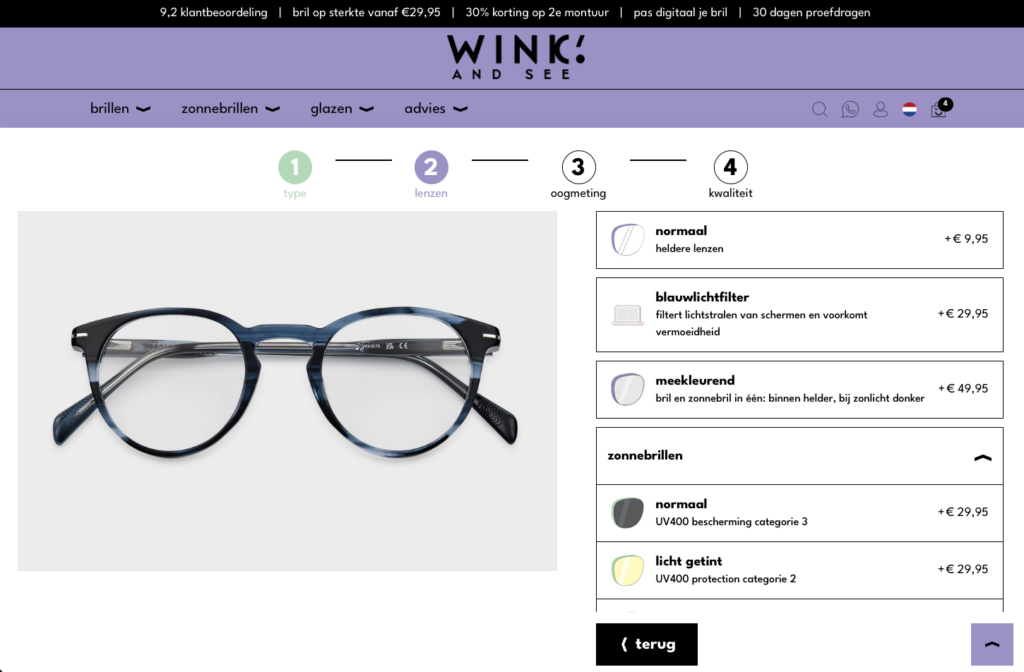
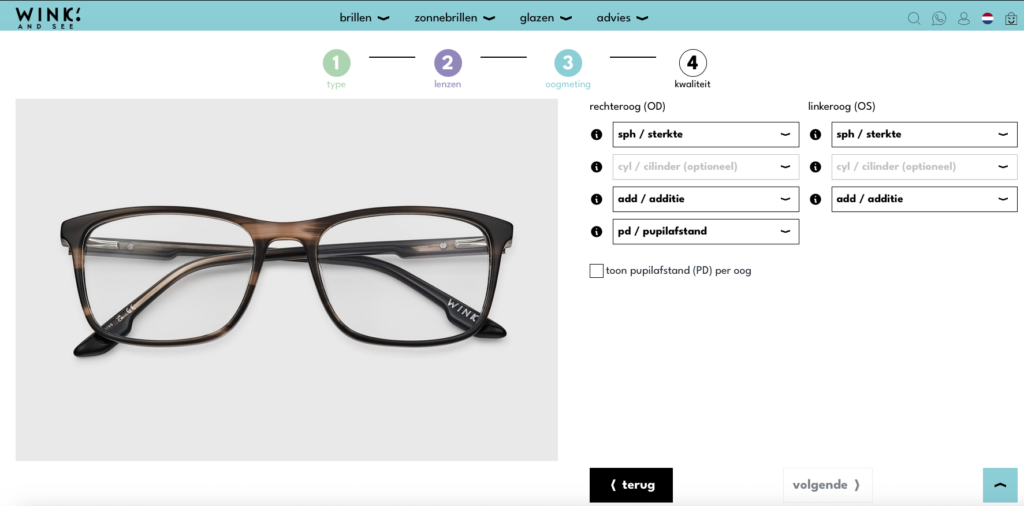
Our approach: a step-by-step configurator as a custom Magento 2 module

Younify developed the lens configurator as a custom Magento 2 module, fully integrated into Wink & See’s existing webshop. The configurator guides the customer through the entire selection process in clear, manageable steps.

Step 1 — Frame selection

The customer first chooses a frame. This is the starting point of the configuration and determines which lens options are available. The frame is a regular Magento product with images, sizes, and a virtual try-on property, allowing customers to virtually try the frame on their face via Wink & See's built-in tool.

Step 2 — Selecting lens type

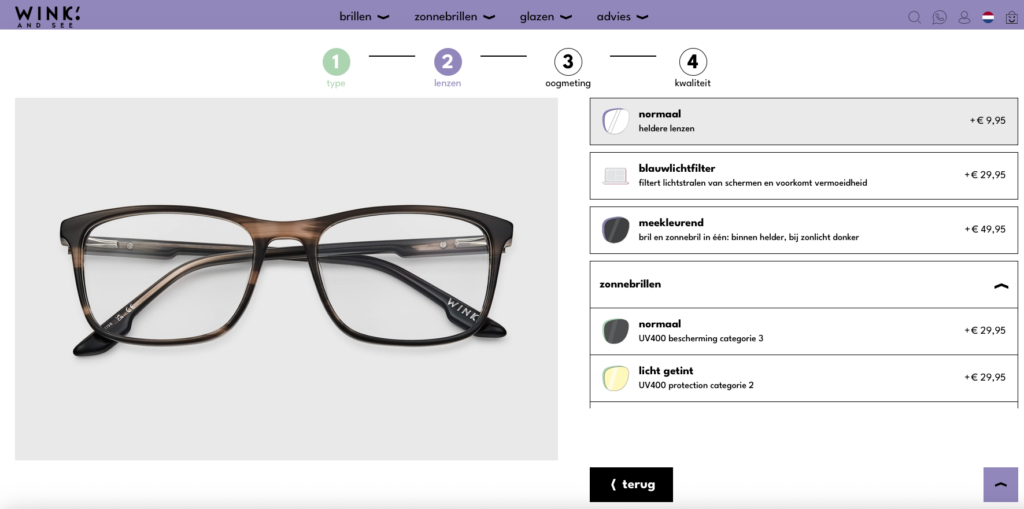
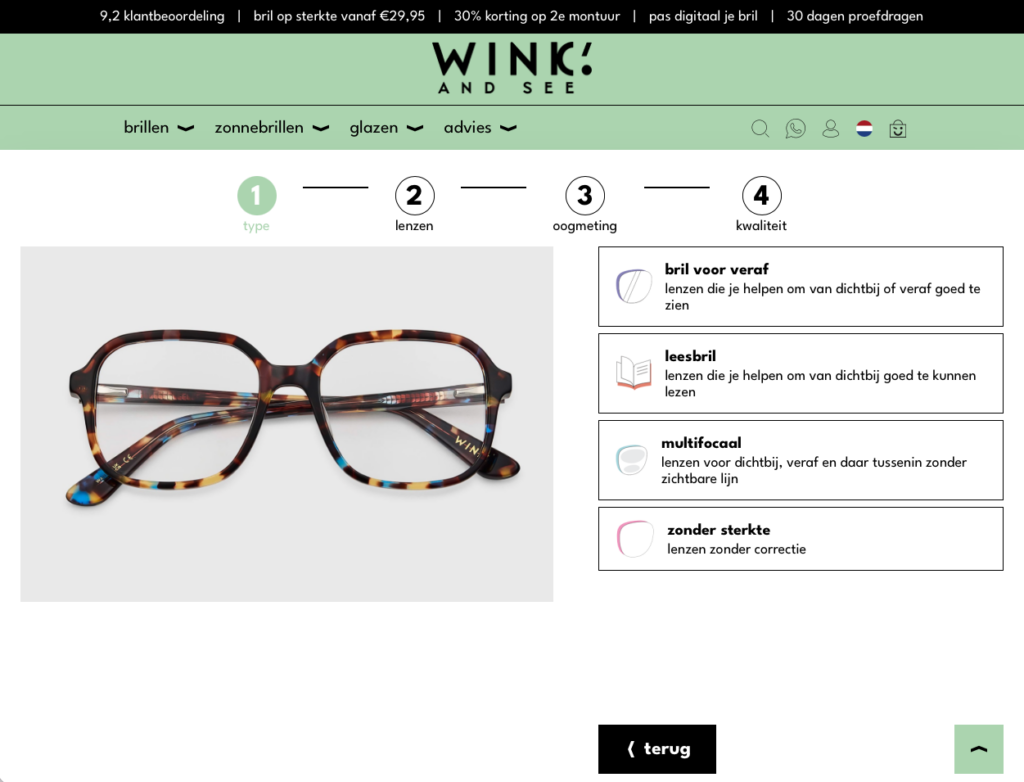
In the second step, the customer chooses the type of lens: single-vision, multifocal, reading, sun, photochromic, or non-prescription. Each option has its own surcharge that is immediately visible. The step is intentionally limited to a clear overview: the customer sees what each option is, what it costs, and who it is suitable for.

Step 3 — Entering prescription

This is where it gets personal. The customer enters the values from their prescription for each eye: sphere (SPH), cylinder (CYL), axis (AXIS), and for multifocal lenses, the addition (ADD). The module validates each entry based on optically sound ranges. Incorrect combinations are immediately flagged with clear messages. Customers can also save their prescription values in their account to make future orders even faster.

Step 4 — Extra options and coatings

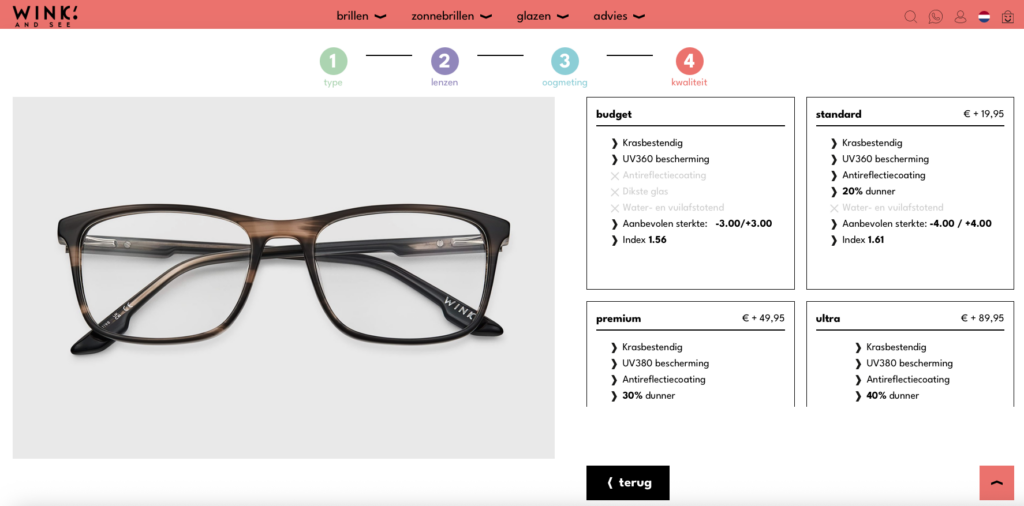
The customer can then add extra options: anti-reflective coating, blue light filter, scratch-resistant coating, or an upgrade to thinner lenses. Each option is clearly explained, and the price impact is immediately visible in the running total.

Step 5 — Prism and pupillary distance

For customers requiring prism correction or a specific pupillary distance (PD), there is an optional fifth step. This step is only visible when relevant, keeping the process as simple as possible for the majority of customers.

Real-time price updates

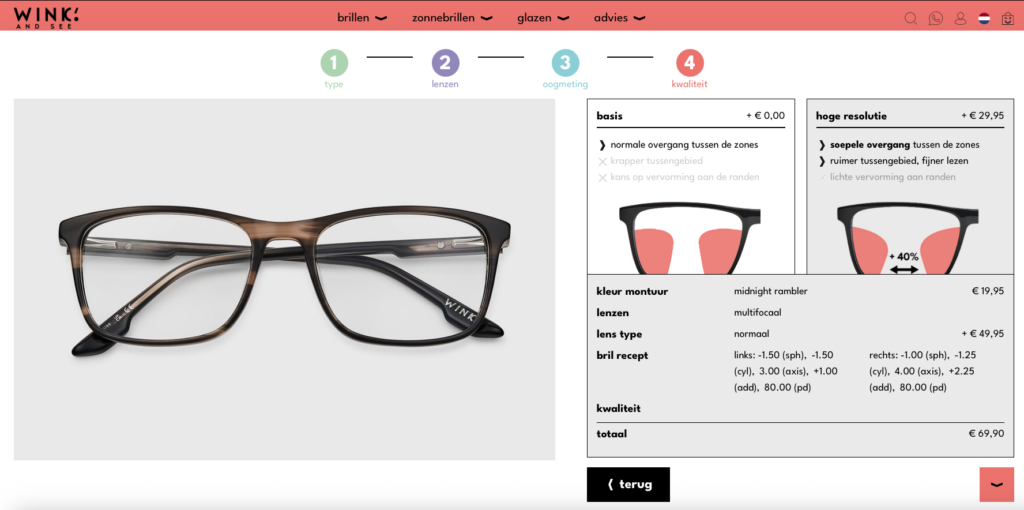
Throughout the entire configuration process, the customer sees a live price overview. Every choice — lens type, coating, prescription option — is immediately calculated. No hidden costs, no surprises at checkout. Transparency is a core value of Wink & See, and the configurator reflects that.

Technical highlights

Fully admin-manageable

One of the most important requirements was that the Wink & See team could make changes independently. All step options, prices, descriptions, and available combinations are configurable from the Magento admin. Adding new lens types, temporarily disabling a coating, or adjusting the price of the blue light filter? The team can do it themselves without developer intervention.

Prescription storage in customer account

Customers who enter their prescription can save these details in their Wink & See account. For a subsequent order, such as prescription sunglasses or a spare pair, the prescription values are automatically loaded. This significantly lowers the barrier and shortens the order flow.

Built on Hyvä

The Wink & See webshop runs on the Hyvä theme, known for its performance and lightweight frontend. The configurator is seamlessly integrated into the Hyvä frontend, using Alpine.js for interactive elements. The result: a fast, smooth configuration experience without the heavy JavaScript overhead associated with Luma or PWA Studio.

Validation and error handling

Optical values are not arbitrary. SPH values typically range from −20.00 to +20.00 in steps of 0.25, CYL from −6.00 to 0.00, and AXIS from 0 to 180. The module validates every entry in real-time and prevents customers from ordering impossible combinations. If no CYL is entered, AXIS is automatically disabled, exactly as an optician would handle it.

The result

  • Independent ordering. Customers configure and order their prescription glasses entirely independently, 24/7, without assistance from an optician or customer service.
  • Lower barrier. The step-by-step approach makes a complex product accessible. Customers who were previously hesitant to buy prescription glasses online are now guided by a clear, structured process.
  • Fewer customer service inquiries. Because the configurator validates in advance and provides clear information, there are fewer questions regarding lens types, pricing, and prescription entry.
  • Higher conversion. The transparent price structure and smooth flow contribute to a higher conversion rate on product pages.
  • Full admin independence. The Wink & See team independently adjusts options, prices, and availability. This makes them agile and independent of development time for daily changes.

Conclusion

Building a lens configurator in Magento 2 is not a matter of simply installing an extension. It requires a deep understanding of both the e-commerce platform and the product domain—in this case, optics. By developing the lens configurator as a custom module, fully manageable from the admin and seamlessly integrated into the Hyvä frontend, Younify has delivered a solution for Wink & See that puts the customer first.

The result is a webshop where customers can confidently configure their prescription glasses as if they were at the optician, but from the comfort of their own living room.

Ready to realize this for your webshop too?
Partner with our Magento specialists and discover what is possible.

Schedule a meeting

Why choose Younify?

Expertise

Magento and Hyvä specialists focused on performance and growth. From development and support to implementation, we know the Magento platform inside out and understand what is required to scale.

Dedication

Committed to your webshop, from launch to further development. We work closely together, provide proactive input, and continuously optimize for the best results.

Trusted partner

A single partner for your complete e-commerce solution. Thanks to strong partnerships and broad expertise, we deliver custom solutions including integrations, support, and optimization.

Scalability

Webshops that grow with your ambitions. We build scalable Magento and Hyvä solutions ready for growth, expansion, and further development.


Ready to renew and grow your Magento webshop?

Let’s work together and discover the possibilities.

This site is registered on wpml.org as a development site. Switch to a production site key to remove this banner.